
iPhone “Non-Genuine Part Installed” — What It Means & How to Fix
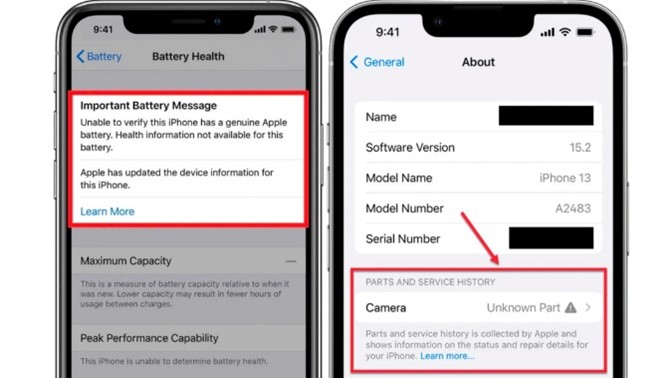
Why You See the Message
- Aftermarket or third-party part installed (display, battery, camera).
- Genuine part not “paired” using Apple’s calibration tools.
- DIY repair without calibration.
Tip: Keep your repair invoice and part details. If pairing is available later, documentation helps.
Will the iPhone Still Work?
Yes—functionality continues, but some features may be limited:
- Battery: Health % may not show.
- Display: True Tone / auto-brightness may be affected.
- Camera: Advanced modes (e.g., Portrait) may be impacted.
How Long the Warning Stays
- Lock screen: ~4 days
- Settings → About: ~15 days
- After that: remains listed in About (no more pop-ups)
Can You Remove It?
Not officially. To avoid warnings, use genuine parts installed by Apple or certified providers that can pair/calibrate compatible modules.
Is Paying Extra for Genuine Worth It?
If you want the full feature set, warranty support, and no warning—yes. Third-party parts are cheaper but may show alerts and affect resale value.
FAQs
Does the alert mean my phone is unsafe?
No. It indicates Apple can’t verify that component. Test key functions; if all good, you can keep using the device.
Will a future iOS update remove the message?
Unlikely. The message is tied to part identification and pairing, not a transient bug.
Can I pair a non-genuine part?
No. Pairing is designed for genuine parts through approved tools and channels.